

Windows 11 Home or Pro?
Windows 11 offers improved functions, maximum security and a modern user interface. Whether you’re a gamer, a streamer, a professional or an IT administrator, when you buy a Joule Performance system the choice is yours. Pick either the Windows 11 Home version or the Pro version. The differences aren’t all that easy to spot at first glance. So, here, we’ll take a closer look at the functions of Windows 11 and the two versions (Home and Pro), and explain which version is the best one for you.
Windows 11: offering advantages for everyone
» Improved functions
Windows 11 comes with a multitude of functions that make your computer both smarter and faster. Speedier startup, improved graphics and easier multitasking make both working and gaming more enjoyable and productive.
» The most secure version of Windows ever
Windows 11 protects your personal data with hardware-based security functions such as TPM 2.0 and offers a powerful Windows Defender to protect against viruses and malware. Stay protected with regular updates. That way, you’ll be able to work and play with peace of mind, without having to worry about threats and maintaining your privacy.
» New user interface
Windows 11 is more user-friendly and offers a tidy start menu, better window organisation and simple customisation options. So you can find and do things faster.
Windows 11 for gaming
Windows 11 takes the gaming world into a whole new dimension. Faster loading times, an optimised gaming mode, a huge games library and many other functions make Windows 11 the ultimate choice for gamers. Windows 11 Pro also offers exclusive features for enthusiasts and users who use their PC as a work device during the daytime and as a gaming system in the evening.
Read on to find out about the highlights that Windows 11 offers for gaming:

Game mode: the real game changer
When you start a game, Game mode automatically switches off all unimportant background processes to free up maximum performance for your game. That means fewer delays, smoother graphics and a better response time.
Your PC focuses only on what really counts – your game!
DirectStorage: gaming without waiting times
DirectStorage is the key to a seamless gaming experience with Windows 11. Optimised data transfer between the hard drive and graphics card minimises loading times, and games start in a matter of seconds.
The result: more time spent in the game, less time spent waiting.


Xbox integration: gaming worlds united
Windows 11 opens the door between PC-based gaming and the games console! The Xbox Game Pass offers a huge library of games. Scores are seamlessly synced between your PC and your Xbox. And Xbox Live brings all the gamers into a single team.
Enjoy a seamless gaming experience – wherever you want, whenever you want.
Windows 11 Pro gets more gaming performance out of every system:
DirectStorage: DirectStorage optimises data transfer between the hard drive and the GPU, ensuring a smoother gaming experience and faster game launches.
Auto HDR: Auto HDR in Windows 11 makes colours more vivid and graphics more impressive, without developers needing to make any adjustments. Older games in particular benefit from this.
Improved graphics performance: Optimised support for DirectX 12 ensures better graphics and performance in games.
Windows 11 supports both streamers and creatives with the following functions:
Better screen recording and streaming: Windows 11 has integrated tools so you can record and stream games easily. So streaming is child’s play!
Broadcasting: The Xbox Game Bar provides quick access to the integrated ‘Broadcasting’ function for streaming without any need for additional software.
Xbox streaming: Integration with Xbox allows you to play and stream your Xbox games directly from a PC.
The Xbox integration expands the gaming horizon:
Xbox Game Pass for PC: Windows 11 gives you access to the Xbox Game Pass for PC, which offers an extensive library of games that you can download and play directly.
Score synchronisation: Your game progress is synced between your Windows 11 PC and your Xbox console for a seamless gaming experience.
Xbox Live: Join the Xbox Live gaming community to play with friends, track achievements and more besides.
Windows 11 Pro offers additional features for enthusiasts:
Virtualisation: Windows 11 Professional supports Hyper-V virtualisation technology, which allows you to create virtual machines for testing games or running different operating systems.
BitLocker: With BitLocker encryption technology, you can protect your game and user data even better.
Remote desktop: Windows 11 Professional offers advanced functions that allow you to control your PC from a different location. This allows you to play games on another device or start downloads while you’re out and about, for example.
Buy a gaming PC with Windows 11 Pro
For the best high-end gaming PCs, we at Joule Performance choose only the best: the best components, the best service and the best operating system. With Windows 11 Pro pre-installed, you can enjoy all the functions that will take your gaming experience to the next level and have all the exclusive Pro features available when you need them. Choose your Pro system now


Windows 11 for Business, Enterprise und Professional
While Windows 11 Home may be sufficient for normal use, Windows 11 Pro offers the features and tools that professional users and enterprises of all sizes need to be productive and secure.
Windows 11 Pro supports more powerful hardware:
Processor
The Pro edition of Windows 11 supports the use of two processors in the system. Furthermore, the operating system can use up to 128 processor cores. The Home Edition only supports 64 CPU cores.
Working Memory (RAM)
Windows 11 Pro allows up to 2 TB of RAM. In comparison, the Home Edition can use a maximum of 128 GB.
Windows 11 Pro stands out with these security features::
Encryption: Bitlocker encryption technology can be used, for example, to encrypt boot drives or other separate sectors of data storage, protecting data from unauthorized access.
Virtualization: With the Hyper-V virtualization technology, other operating systems can be run in a separate window.
Application Guard: Windows Defender Application Guard isolates untrusted websites. This allows the browser to be used like a sandbox.
Windows Sandbox: With the Windows Sandbox, a virtualized desktop environment can be created where unknown applications can be completely isolated and tested securely.
Windows 11 Pro supports IT administrators with the following management features:
Efficient configuration: group policies allow system administrators to configure entire groups of devices in one step.
Centralized update control: With the Update for Business feature, enterprise system administrators control how updates are distributed to users.
Enhanced remote desktop control: Remote access saves time and travel for the system administrator.
For which scenarios and users is Windows 11 worthwhile?
Compact Mini PCs
for companies
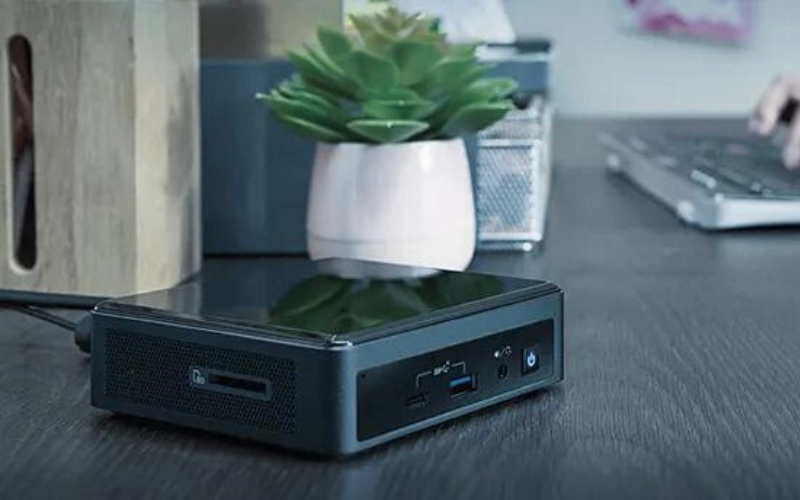
Primarily, medium to larger companies benefit from the Pro features. The exclusive management functions and the higher security support companies enormously in their everyday work.
Workstations for professionals with
special applications

Whether intensive video editing, complex 3D modeling or measuring work with the help of drones: For applications that place extreme demands on the hardware, the Pro version is the right choice.
Windows 11 Home and Pro: The most important functions in comparison
WINDOWS 11
PRO
WINDOWS 11
HOME
BitLocker device encryption
If your device is lost or stolen, BitLocker puts everything on lockdown, so no one else can access your systems or data.

Centralized update management
With the Update for Business feature, enterprise system administrators control how updates are distributed to users.
Windows Information Protection (WIP)
Helps protect enterprise apps and data against accidental data leaks on enterprise-owned devices and personal devices that employees bring to work.
Advanced hardware support
Supports up to 2 TB RAM (Home Edition: 128 GB) and two processors in the system with up to 128 processor cores (Home Edition: 64 CPU cores)
Device encryption
If you turn on device encryption, only authorized individuals will be able to access your device and data.
Windows Security
View and manage the security and health of your device.
Firewall and network protection
Your Windows device comes with built-in security features to help safeguard against viruses, malware, and ransomware.
DirectX 12 Ultimate support
State-of-the-art graphics and gaming features for improved performance, lower latency, and enhanced graphics quality for gaming.
Internet protection
App & browser control in Windows Security helps protect your device from potentially dangerous apps, files, websites, and downloads.
Secure boot
Helps prevent malicious software applications and unauthorized operating systems from loading during the system start-up process.
Windows Hello
Uses facial recognition, fingerprint, or PIN, for a fast, secure, and password-free way to unlock your compatible Windows devices.


